

In today’s digital age, visual content plays a crucial role in capturing audience attention and conveying messages effectively. As content creators and marketers, we’re constantly on the lookout for high-quality images and videos to enhance our projects. That’s where Adobe Stock comes in.
Adobe Stock is a powerful platform that offers millions of royalty-free assets, including photos, illustrations, videos, and more. It’s seamlessly integrated with Adobe’s Creative Cloud suite, making it an invaluable resource for designers, marketers, and creatives across industries. We’ll explore how Adobe Stock can streamline your workflow, save time, and elevate your creative projects to new heights.
Key Takeaways
- Adobe Stock offers millions of high-quality, royalty-free assets integrated with Creative Cloud
- Flexible licensing options include Standard and Extended licenses, with various subscription plans
- Advanced AI-powered search and diverse content categories streamline asset discovery
- Seamless integration with Adobe Creative Cloud apps enhances workflow efficiency
- Contributor Program allows creators to monetize their work through the platform
- Enterprise solutions cater to large organizations with custom plans and volume discounts
What Is Adobe Stock?
Adobe Stock is a comprehensive digital asset marketplace offering millions of high-quality, royalty-free images, videos, and graphics. It’s seamlessly integrated with Adobe’s Creative Cloud suite, providing creatives with instant access to a vast library of content.
Key Features and Offerings
Adobe Stock boasts an extensive collection of assets that rivals popular platforms like iStock and Getty Images. Here are some of its standout features:
- Diverse Content: We find millions of photos, illustrations, vectors, videos, and templates across various categories.
- Affordable Options: Adobe Stock offers competitive pricing, making it a viable alternative for those seeking cheap stock photos without compromising quality.
- Integration: It’s fully integrated with Adobe Creative Cloud apps, streamlining workflows for designers and content creators.
- AI-Powered Search: Advanced search functionality helps users find the perfect assets quickly and efficiently.
- Customizable Assets: Many assets are editable, allowing for easy customization within Adobe applications.
- Contributor Program: Creatives can earn money by selling their work on the platform, similar to programs offered by Shutterstock.
Adobe Stock’s comprehensive offerings make it a powerful resource for professionals seeking high-quality visual content for their projects.
Licensing Options and Pricing
Adobe Stock offers flexible licensing options to suit various creative needs and budgets. We’ll explore the different licenses available and their associated pricing structures.
Standard vs. Extended Licenses
Adobe Stock provides two main types of licenses: Standard and Extended. The Standard license covers most common usage scenarios, while the Extended license offers broader rights for more extensive commercial applications. Here’s a breakdown of the key differences:
Standard License:
- Allows unlimited digital views
- Permits use in marketing and advertising materials
- Includes social media usage rights
- Caps print runs at 500,000 copies
Extended License:
- Includes all Standard license rights
- Allows unlimited print runs
- Permits use in merchandise for resale
- Grants rights for use in templates and on-demand services
When compared to other platforms like Getty Footage or iStock Vetta, Adobe Stock’s licensing options are competitively priced and offer similar usage rights. However, Adobe Stock’s integration with Creative Cloud apps gives it a unique advantage for users already working within the Adobe ecosystem.
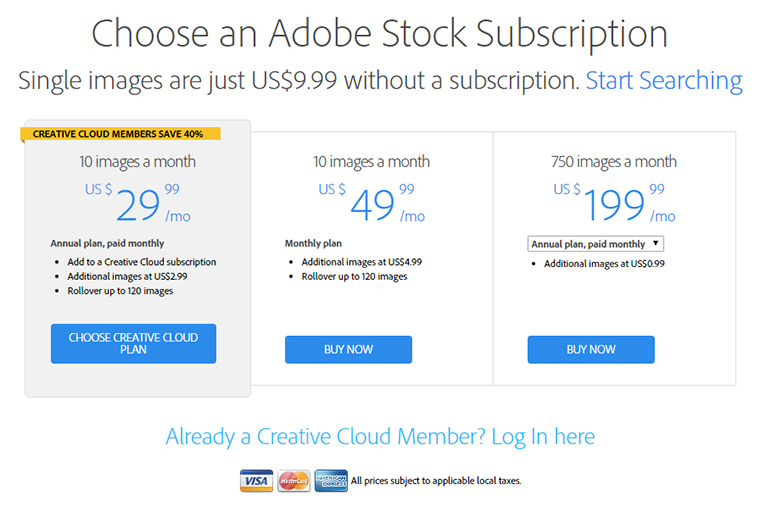
Subscription Plans
Adobe Stock offers various subscription plans tailored to different usage levels:
- Annual plans with monthly payments:
- 10 images per month
- 40 images per month
- 750 images per month
- Monthly plans with no annual commitment:
- 10 images per month
- 40 images per month
- Credit packs:
- Pay-as-you-go option
- Credits can be used to purchase images, videos, and templates
These subscription options provide flexibility for users with varying needs, from occasional image purchases to high-volume content requirements.
Image Packs
For those seeking cheap stock photos without a subscription commitment, Adobe Stock offers image packs:
- 5 images
- 10 images
- 25 images
These packs allow users to download a set number of images within a year, providing a cost-effective solution for small-scale projects or infrequent asset needs.
Enterprise Solutions
Adobe Stock also caters to large organizations with custom enterprise plans. These plans offer:
- Volume discounts
- Tailored licensing terms
- Dedicated support
- Integration with enterprise-level Adobe products
Enterprise solutions ensure that large teams can access and manage stock assets efficiently while maintaining brand consistency across projects.
Image Quality and Selection
Adobe Stock offers an extensive library of high-quality images and diverse content selections. We’ll explore the platform’s impressive range of categories and the exceptional quality of its visual assets.
Categories and Diversity
Adobe Stock boasts a vast array of categories, catering to various creative needs. From stunning photography to eye-catching illustrations, the platform offers millions of options across numerous genres. Users can find content for industries such as business, technology, lifestyle, nature, and more. The diversity of Adobe Stock’s collection rivals that of other major players like Getty Footage and iStock Vetta, ensuring creatives can find the perfect asset for their projects.
Quality Standards
Adobe Stock maintains rigorous quality standards for all content on its platform. Every image undergoes a thorough review process to ensure it meets Adobe’s high-quality benchmarks. This commitment to excellence sets Adobe Stock apart from platforms offering cheap stock photos, as users can trust that they’re accessing premium content. The platform’s quality control measures include checks for technical aspects like resolution, noise levels, and color accuracy, as well as creative elements such as composition and subject matter relevance.
Search and Discovery Features
Finding the right image is made easy with Adobe Stock’s advanced search and discovery features. The platform utilizes AI-powered search algorithms to help users quickly locate relevant content. Filters allow for refining searches based on factors like orientation, color, and style. Adobe Stock’s intuitive interface and smart tagging system make it efficient to browse through millions of assets, saving time and streamlining the creative process.
Exclusive Content
Adobe Stock offers exclusive content that can’t be found on other stock image platforms. This includes Premium and Editorial collections featuring unique, high-end imagery from professional photographers and artists. The platform also provides access to 3D assets, templates, and Adobe Stock’s signature visual trends, giving creatives an edge in producing distinctive work.
Integration with Adobe Creative Cloud
Adobe Stock’s seamless integration with Adobe Creative Cloud apps revolutionizes the creative workflow for professionals. This integration offers numerous benefits that streamline the design process and enhance productivity.
Seamless Workflow Benefits
Adobe Stock’s integration with Creative Cloud provides a smooth, efficient workflow for creatives. Users can search, preview, and license Adobe Stock assets directly within their favorite Creative Cloud apps, eliminating the need to switch between platforms. This seamless integration saves time and maintains creative momentum, allowing designers to focus on their projects without interruption.
Unlike platforms such as Getty Footage or iStock Vetta, Adobe Stock’s direct integration with Creative Cloud apps offers unique advantages. Creatives can easily incorporate high-quality stock assets into their work without leaving their preferred design environment. This streamlined process not only enhances productivity but also encourages experimentation and creativity.
The integration also enables users to save watermarked previews of Adobe Stock assets to their Creative Cloud libraries. These previews can be used in designs and layouts before purchase, allowing for better visualization and decision-making. Once licensed, the full-resolution asset automatically replaces the preview across all linked projects, ensuring a smooth transition from concept to final product.
Search and Discovery Tools
Adobe Stock’s search and discovery tools are designed to help users find the perfect assets quickly and efficiently. We’ll explore the platform’s advanced features that make content discovery a breeze.
AI-Powered Search Capabilities
Adobe Stock leverages cutting-edge artificial intelligence to enhance its search functionality. Unlike platforms such as iStock Vetta or Getty Footage, Adobe Stock’s AI-powered search goes beyond basic keyword matching. It analyzes image content, recognizing objects, colors, and compositions to deliver more accurate results. Users can easily find relevant assets by describing scenes or concepts, even without knowing specific keywords. This advanced capability sets Adobe Stock apart from other platforms offering cheap stock photos, ensuring users find high-quality assets that match their creative vision precisely.
Contributor Program
Adobe Stock’s Contributor Program offers creators a lucrative opportunity to monetize their visual content. This program allows photographers, illustrators, videographers, and other creatives to upload and sell their work through Adobe’s expansive marketplace.
Earning Potential for Creators
Adobe Stock’s Contributor Program provides a competitive platform for creators to earn money from their visual assets. Unlike platforms such as iStock Vetta or Getty Footage, Adobe Stock offers a unique advantage through its integration with Creative Cloud, potentially increasing exposure and sales for contributors. Earnings vary based on factors such as content type, exclusivity, and licensing options. Contributors receive a percentage of each sale, with rates typically ranging from 20% to 60% of the asset’s selling price. High-quality, in-demand content can generate substantial passive income over time, making Adobe Stock an attractive option for creators looking to monetize their work.
Comparison to Other Stock Image Platforms
Adobe Stock stands out in the competitive landscape of stock image platforms, offering unique advantages when compared to other industry leaders like iStock Vetta, Getty Footage, and Shutterstock. While each platform has its strengths, Adobe Stock’s integration with Creative Cloud gives it a significant edge for many users.
Content Quality and Variety
Adobe Stock matches its competitors in terms of content quality and variety. Like iStock Vetta and Getty Footage, Adobe Stock offers a vast library of high-quality images, videos, and graphics. However, Adobe Stock’s AI-powered search functionality often makes it easier to find relevant content quickly.
Pricing and Licensing
When it comes to pricing, Adobe Stock offers competitive rates compared to other platforms. While it may not always be the cheapest option, the value it provides through its integration with Creative Cloud often justifies the cost for many users. Adobe Stock’s flexible licensing options, including Standard and Extended licenses, are comparable to those offered by iStock Vetta and Getty Footage.
Integration and Workflow
The seamless integration with Adobe Creative Cloud apps sets Adobe Stock apart from its competitors. This feature allows users to search, preview, and license assets directly within their preferred design environment, a functionality not available with platforms like Shutterstock or Getty Footage.
Special Features
Adobe Stock’s customizable assets and 3D content offer unique advantages over some competitors. While platforms like Shutterstock provide similar features, Adobe Stock’s integration with Creative Cloud apps makes these features more accessible and easier to use for Adobe users.
Contributor Program
Adobe Stock’s Contributor Program is competitive with other platforms, offering creators a chance to monetize their work. The earning potential is similar to that of iStock and Shutterstock, with contributors receiving a percentage of each sale.
While Adobe Stock may not always offer the cheapest stock photos, its combination of high-quality content, integration with Creative Cloud, and competitive pricing make it a compelling choice for many creative professionals. However, users should compare features and pricing across multiple platforms to find the best fit for their specific needs and budget.
Adobe Stock for Businesses
Adobe Stock offers tailored solutions for businesses of all sizes, providing access to a vast library of high-quality assets to enhance creative projects and marketing efforts. We’ll explore how Adobe Stock caters to the unique needs of businesses, from small startups to large enterprises.
Enterprise Solutions
Adobe Stock’s enterprise solutions provide large organizations with comprehensive access to premium visual content, streamlining asset management and ensuring brand consistency. These solutions offer:
- Volume discounts: Bulk purchasing options for cost-effective asset acquisition
- Custom licensing terms: Flexible agreements tailored to specific business needs
- Dedicated support: Personalized assistance for seamless integration and usage
- Advanced rights management: Tools to track and control asset usage across teams
- Integration with enterprise workflows: Seamless incorporation into existing systems
Unlike platforms such as Getty Footage or iStock Vetta, Adobe Stock’s enterprise solutions offer deeper integration with Creative Cloud apps, enhancing productivity for creative teams. While competitors like Shutterstock provide similar enterprise offerings, Adobe Stock’s connection to the broader Adobe ecosystem sets it apart for businesses already invested in Creative Cloud.
Pros and Cons of Adobe Stock
Pros
Adobe Stock offers several advantages that make it a compelling choice for creatives and businesses:
- Integration with Creative Cloud: Seamless workflow within Adobe applications
- Extensive library: Millions of high-quality assets across various categories
- AI-powered search: Advanced functionality for finding relevant content quickly
- Flexible licensing: Options to suit different project needs and budgets
- Customizable assets: ability to modify and personalize stock content
- Contributor program: Opportunity for creators to monetize their work
- Enterprise solutions: Tailored offerings for large organizations
Cons
Despite its strengths, Adobe Stock has some limitations to consider:
- Pricing: Can be more expensive than some competitors offering cheap stock photos
- Learning curve: Requires familiarity with Adobe’s ecosystem for optimal use
- Limited free options: Fewer free assets compared to some other platforms
- Subscription focus: May not be cost-effective for infrequent users
- Content overlap: Some assets available on other platforms like iStock Vetta or Getty Footage
- No unlimited downloads: Unlike some competitors, Adobe Stock doesn’t offer unlimited download plans
While Adobe Stock provides numerous benefits, especially for Adobe Creative Cloud users, it’s essential to weigh these pros and cons against alternatives like iStock Vetta, Getty Footage, and platforms offering cheap stock photos to determine the best fit for specific needs and budgets.
Conclusion
Adobe Stock stands out as a powerful platform for creative professionals and businesses seeking high-quality visual content. Its seamless integration with Creative Cloud apps streamlines workflows and enhances productivity. With an extensive library AI-powered search and flexible licensing options Adobe Stock caters to diverse creative needs. While it may have a steeper learning curve and higher pricing compared to some alternatives it offers unique features like customizable assets and enterprise solutions. We believe Adobe Stock’s combination of quality content advanced technology and integration makes it a valuable resource for those looking to elevate their creative projects in today’s visually-driven digital landscape.



 Although the stock site has only been in the industry for a little over a year, it certainly has impressed the creative community. Adobe Stock has unique features that make it worth considering, especially for Creative Cloud users. You can work faster as you can search for the perfect image right inside your favorite CC desktop application. Not only that, you can also design comp images, license and manage them directly.
 An Adobe Stock license allows you to use the stock files anywhere in the world. You can use them in print, websites, social media sites, and presentations, but you may not distribute them in a way that people may use it without licensing them.